Issues with Okular PGP signature error
Testing, NormalPublic

Assigned To
Authored By
CarlSchwan
Mar 11 2025, 5:24 PM
Subscribers

Description

When trying to sign a document with Okular with a PGP signature on Windows I encountered the following issue when saving a file

Could not sign. Could not write to 'C:/Users/Carl/Downloads/mydocument.pdf`

Okular prompted me for a location for a file called mydocument_signed.pdf, so I am not even sure why it's trying to save at mydocument.pdf

Okular does create a mydocument_signed.pdf but when opening that file with okular, I am getting the following issue:

This document is digitally signed. Some of the signatures could not be validated properly.

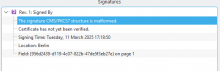
And this is the result in the signature pane
Event Timeline

• werner triaged this task as Normal priority.Mar 12 2025, 9:21 AM
• werner added projects: okular, Bug Report.

Something went wrong during signing - the question is what.

The error message is obviously wrong. That's a minor issue in Okular; it puts document->location() in the error message instead of signedDocumentPath.

Your signature pane screenshot looks closer to a malformed document than a proper one. Can you share the document?

Are there anything in debug viewer if you try to reproduce it?

We investigated this a bit and it only happens when trying to sign with a non VSD key when gnupg is in VSD mode

svuorela changed the task status from Open to Testing.Jul 28 2025, 4:13 PM

We have now improved error messages, and this, combined with what could be considered a setup issue, I think we can consider this done for now.