How to reproduce:
- You need a smartcard with expired certificates (e.g. an old NetKey v3 card)
- Insert the card and open the smartcard window
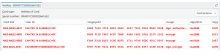
- When the card has been fully loaded the smartcard slots/certificates are displayed with red color (as expected):
- Now delete some (or all) of the certificates (via the certificate list)
- When the smartcard window has been the smartcard slots/keys are still displayed with red color (NOT as expected):
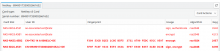
The smartcard slots without matching certificate should be displayed with neutral color as done before the certificates have been loaded from the card.
This is more a cosmetic issue and usually people won't delete certificates belonging to inserted smartcards. -> Low priority