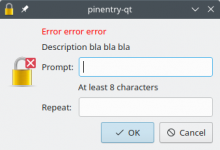
pinentry-qt with error message and weird looking image on the left side:
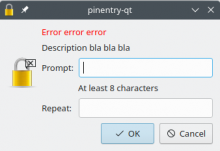
The image on the left side is created by overlaying the application icon with a small version of the QStyle::SP_MessageBoxCritical icon. I suppose that with other styles this looked good because the small icon looked similar to the critical icon in the Qt documentation (https://doc.qt.io/qt-5/qmessagebox.html#severity-levels-and-the-icon-and-pixmap-properties), but in the Breeze style the icon looks completely out of place.
To reproduce run pinentry as follows:
cat <<EOF | pinentry
setdesc Description bla bla bla
seterror Error error error
setprompt Prompt:
setrepeat Repeat:
option constraints-enforce
option constraints-hint-short=At least 8 characters
getpin
EOF